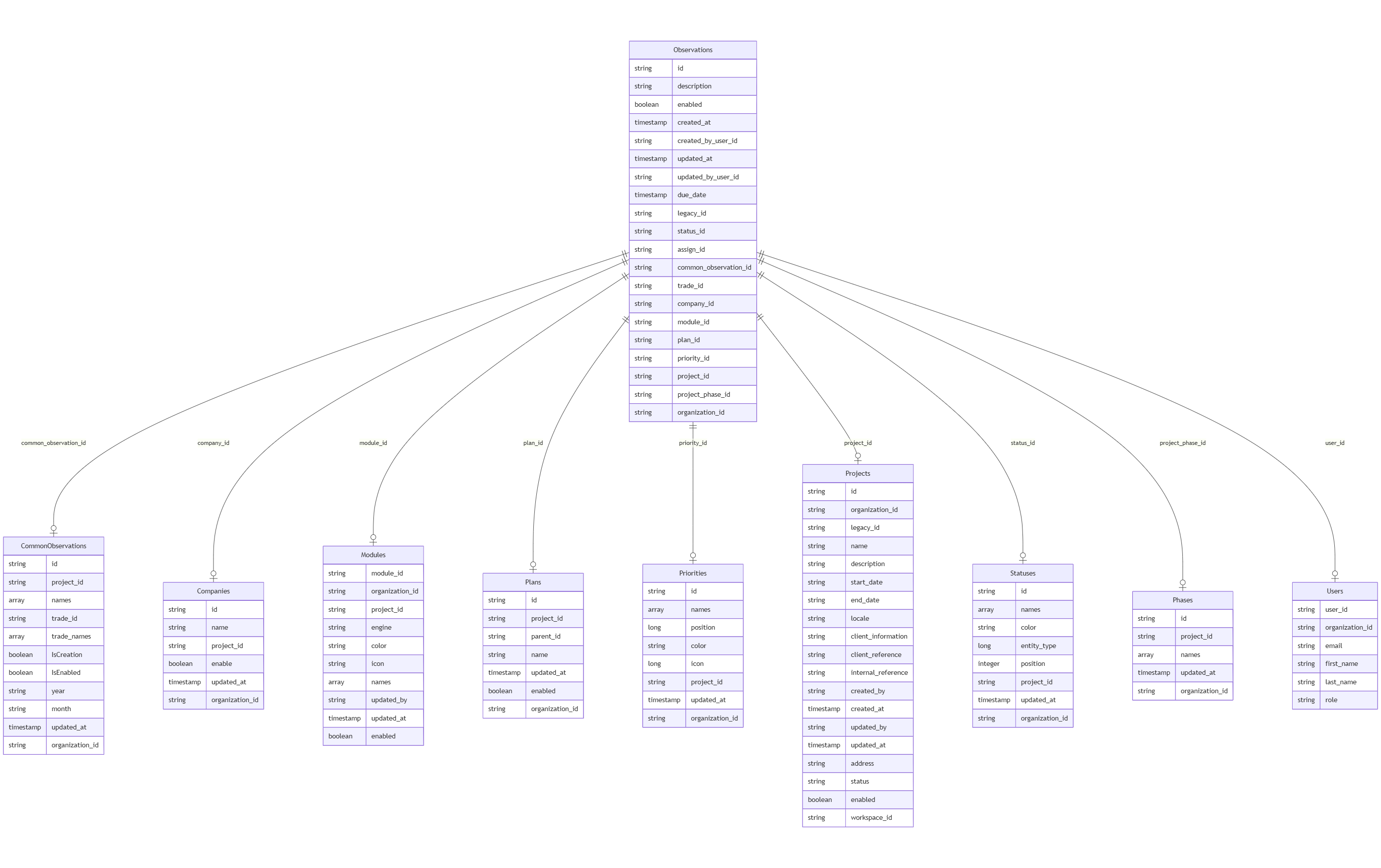
The Observations dataset plays a crucial role in tracking issues reported on construction sites through the Finalcad One application. This dataset connects to several others, providing additional context and supporting information essential for project and issue management. Below are the datasets directly related to Observations, with their connection points highlighted.
CommonObservations
Link: The common_observation_id in Observations links to the id in CommonObservations.
Schema Overview: CommonObservations represents standardized types of issues, including attributes like multilingual names, trade IDs, and status indicators (such as IsCreation and IsEnabled). This connection allows each observation to be categorized under a specific, predefined issue type, enhancing consistency in issue reporting and analysis across projects.
Companies
Link: The company_id in Observations links to the id in Companies.
Schema Overview: Companies contains data about construction companies, including attributes like name, enabled status, and organization_id. This link enables each observation to be associated with a specific company involved in the project, supporting company-specific issue tracking and reporting.
Modules
Link: The module_id in Observations corresponds to module_id in Modules.
Schema Overview: Modules provides data such as the construction module's engine, color, and icon, with multilingual names. By linking each observation to a module, this connection helps categorize issues based on specific functional areas or project components, making it easier to organize and address observations by module.
Plans
Link: The plan_id in Observations links to the id in Plans.
Schema Overview: Plans includes attributes like name, parent_id, and organization_id, structuring the project into organized segments. This connection places each observation within a specific project plan, aiding in the planning and prioritization of issues across the project's phases.
Projects
Link: The project_id in Observations connects to the id in Projects.
Schema Overview: Projects represents the main project context, including fields like organization_id, name, description, start_date, and end_date. This linkage places each observation within a specific project scope, facilitating comprehensive project management and overview of all reported issues.
Phases
Link: The project_phase_id in Observations corresponds to the id in Phases.
Schema Overview: Phases outlines the various project stages, with multilingual names and attributes like updated_at. By associating each observation with a specific phase, this relationship provides context regarding the project stage when the issue was identified, aiding in phase-specific issue tracking.
Statuses
Link: The status_id in Observations links to the id in Statuses.
Schema Overview: Statuses defines the state of observations, with attributes like multilingual names, color, and position. This connection enables tracking the progress or resolution state of each observation, helping teams manage and prioritize issues effectively.
Users
Link: The created_by_user_id and updated_by_user_id fields in Observations link to the user_id in Users.
Schema Overview: Users includes details such as email, first_name, and last_name, identifying the individuals responsible for creating and updating each observation. This association supports accountability and tracking of user actions, enabling better insight into who reported or updated each issue.